
How it works
Every sheet. LIVE.
Cameras go on every sheet of ice in your building, and then every league game and every club event streams itself — start to finish, with nobody in the booth.
Cameras on every sheet
Not the show sheet. Not the sheet with the good camera angle. Every sheet — four cameras each, permanently installed, ready whenever the ice is in.
Two pan-tilt-zoom cameras per sheet
Mounted at roughly 12.5 feet on the end walls and aligned to the exact centreline of each sheet, so every rock is followed down the ice.
Two overhead cameras per sheet
Fixed directly above the centre of each house, about 18 inches behind the tee line — the view that shows a draw actually biting.
Decoders for your in-house screens
The same feeds go to displays around the building, so members in the lounge watch the sheets they are not playing on.
Its own network
A dedicated router and switching, separate from your existing club network, carrying uncompressed video over shielded cabling. 40 Mbps upload is the minimum.
Across our installed facilities that is 100 sheets of ice wired for broadcast, the largest being Saville Curling Center at 10 sheets.
Every league game, automatically
League night is the whole point, and three pieces make it happen without anyone staying late. Together they are the engine that runs your broadcasts — and your only input is the schedule. Every sheet live, without the hassle.
01
The CSPACK
In your building
A custom-built computer we install and configure, driving the cameras and encoding every sheet at once. It lives in a secure space in the building and asks nothing of your staff.
02
The CSM agent
Runs by itself
Software on the CSPACK that checks in with us every 60 seconds, collects the day’s draws and starts and stops each sheet on time. Nobody launches it, and nobody has to be there.
03
The CSM website
Where you come in
Your staff sign in to enter or sync the schedule, manage sponsors and set blackout dates. That is the whole job — everything after it is automatic.
Your schedule, however you already keep it
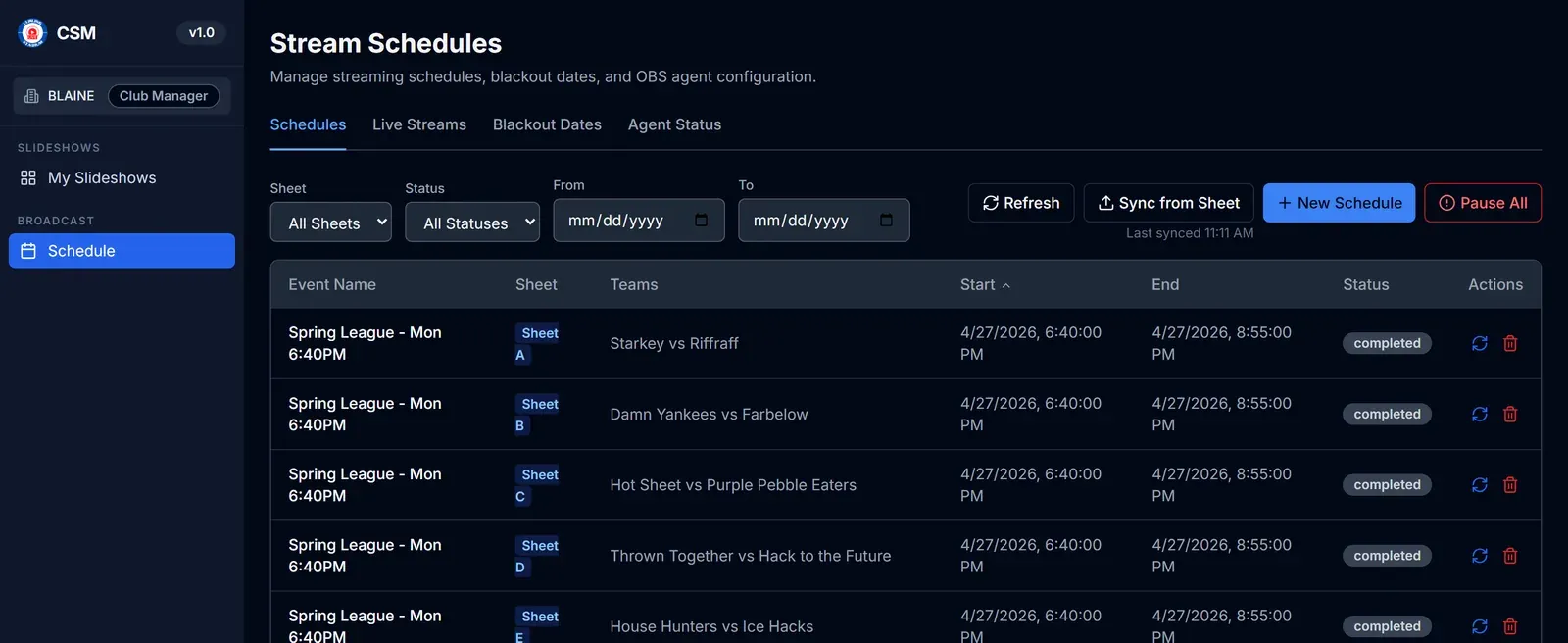
You should not have to maintain the draw twice. Pick the source that matches how your club already works and the schedule keeps itself up to date.
Manual entry
Type games straight into the Schedules page. Nothing to connect.
CSV import
Upload a draw as a spreadsheet export — handy for a whole bonspiel at once.
Google Sheets
Point us at a public Google Sheet and the schedule pulls itself in.
CurlingClubManager
Syncs automatically from your curlingclubmanager.com account.
LeagueApps
Syncs automatically from a LeagueApps-powered club site.
Recurring slots
Define weekly times — day, start, stop, optional league name — and they expand 30 days ahead.
More arriving all the time. We add integrations as clubs ask for them — CurlOps is in progress. If your club runs its schedule somewhere we do not support yet, tell us and it goes on the list.
Step 1
The schedule goes in once
Draw times, sheets and team names arrive on the CSM website however suits you — typed in, imported, or synced automatically from the system your club already uses.
Step 2
Every sheet is picked up
The CSM agent on your CSPACK checks in every 60 seconds and collects the day’s draws silently — all of them, not a chosen few.
Step 3
Every game goes live on time
At the scheduled moment each sheet starts broadcasting on its own — even with nobody in the building.
Step 4
YouTube is titled for you
About 30 seconds in, each broadcast is renamed with the teams, sheet and event, so players and families can find their game.
Step 5
It stops when the game does
At the scheduled end the broadcast ends and the recording is saved to your channel, ready to rewatch.
Hands-free from start to finish. Once the schedule is in, your club does nothing else — including if the internet drops briefly mid-draw.
Every club event too
Bonspiels, club championships, junior playdowns, charity days, a funspiel that got added last week — anything on the ice can go live, scheduled or not.
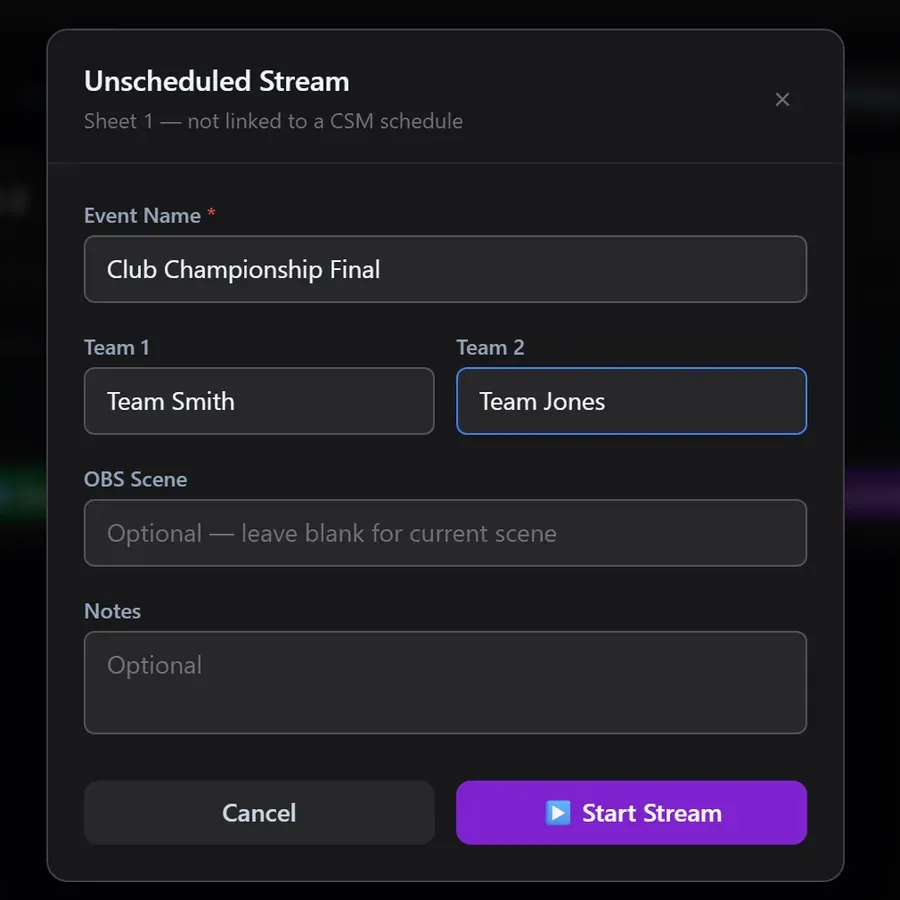
Nothing on the schedule? Start it anyway
A panel in your building starts a stream on any sheet on demand. Enter the event and team names and it goes live with the same graphics and the same YouTube titling as a scheduled game.
Bonspiels are just a bigger schedule
Import the draw as a CSV and the whole weekend runs itself across every sheet, round after round, without anyone rebuilding scenes between games.
And blackout dates when you want quiet
Closed for maintenance, or a private rental that should not be broadcast? Set a blackout and nothing streams, or pause everything instantly with one button.
What your broadcast looks like
The overlay is the layer of graphics sitting on top of your camera feed. You control the parts that change; we build the rest.
In every overlay
- Sponsor slideshow — The rotating sponsor banner area
- Scoreboard — Team names, ends and scores
- Clock or timer — Game and shot clock
- Event ticker — Scrolling text for event information
- Club watermark — Your logo or broadcast branding
Sponsor slideshows are yours
A slideshow is a rotating loop of sponsor banners that plays inside your broadcast during games. Each sponsor gets the screen for however many seconds you choose.
Your staff log in, upload banner images, drag them into the order you want and mark a slideshow active. Changes appear in the broadcast immediately — no design software, and no waiting on us.
Why it matters: every league night becomes sponsor impressions you can sell against.
Ready to sell it? Grab the free sponsorship playbooks →
Who does what
The honest answer to “how much work is this for our volunteers?”
Your club
Self-service, no technical skills
- ✓ Upload and replace sponsor logos whenever you like
- ✓ Set how long each sponsor stays on screen
- ✓ Switch between seasonal slideshows
- ✓ Enter, import or sync your draw schedule
- ✓ Pause, cancel or reschedule individual games
- ✓ Set blackout dates when you are not streaming
- ✓ Start a stream for any event on the spot
- ✓ Preview any change before it goes live
Curling Stadium
Everything technical
- ✓ Install and configure the cameras and broadcast system
- ✓ Connect your YouTube channel
- ✓ Design and build your overlay graphics
- ✓ Monitor every sheet across every facility
- ✓ Handle system updates and equipment firmware
- ✓ Provide support on evenings and weekends, when curling actually happens
Proven at scale
- Facilities
- 17
- Sheets live
- 100
- Countries
- 3
- Largest install
- 10
- Saville Curling Center
Every sheet is monitored centrally, so a problem is usually spotted before anyone at the club notices it.
Requirements & installation
The full technical specification for a Curling Stadium install — camera positions, network, power, mounting and bandwidth.
Worth sending to whoever looks after your building’s network before you talk to us — it covers everything the install depends on, so the site visit has fewer surprises.
Download the specPDF · 1.25 MB · Version 3.0
Ready to turn your facility into a Curling Stadium?
Tell us your club size, sheet count and what you want to broadcast. We will put together a detailed quotation.